- HR:+91-879-9184-787
- Sales:+91-908-163-7774


The world of natural language processing (NLP) has evolved significantly over the last few years, and one of the driving forces behind this transformation is the development of Generative Pretrained Transformers (GPT). GPT model, powered by OpenAI’s architecture, has revolutionized how machines understand and generate human language, opening up possibilities for everything from chatbots to content creation and code generation.
Building your own GPT model can be a rewarding and empowering experience, whether you’re a developer, researcher, or entrepreneur looking to explore the potential of AI. With advancements in technology and the availability of frameworks and tools, creating a custom GPT model is now more accessible than ever.
In this comprehensive guide, we will walk you through the steps needed to build your own GPT model, the tools you will need, and best practices to ensure success in your AI journey. Partnering with AI application development services can help streamline the process and ensure the successful development of your model.
GPT stands for Generative Pretrained Transformer, a type of deep learning model used for natural language processing (NLP) tasks such as text generation, language translation, summarization, question answering, and more. GPT models are based on the transformer architecture, which is a machine learning framework that has become one of the most successful approaches for understanding and generating human language.
Developed by OpenAI, GPT models are pretrained on massive datasets and fine-tuned for specific tasks. The main strength of GPT is its ability to generate coherent and contextually relevant text based on a given prompt. Over time, GPT models have evolved, with newer versions (like GPT-3 and GPT-4) being increasingly capable of handling more complex language tasks with higher accuracy and fluency.
GPT is a generative model, which means it can produce new content (text) based on a given input. For example, you can provide it with a sentence, and it can generate the next few words, or even entire paragraphs, that coherently continue the text.
GPT models are pretrained on vast amounts of text data from the internet, books, articles, and other sources. This means they already have a broad understanding of language patterns, grammar, and context before being used for specific tasks. The pretrained model is then fine-tuned for more specific applications, improving its performance in certain domains.
GPT uses the transformer architecture, which allows it to efficiently process long-range dependencies in text. Unlike traditional models that process text sequentially, transformers look at the entire sequence of words simultaneously, making them more powerful at understanding context and relationships between words over long distances.
GPT models excel at understanding the context of words within a sentence, paragraph, or even a whole document. This is one of the key reasons GPT can generate human-like text—because it doesn’t just predict the next word based on the immediately preceding word, but instead, uses the entire context provided in the input.
You may also want to know AI in Payments
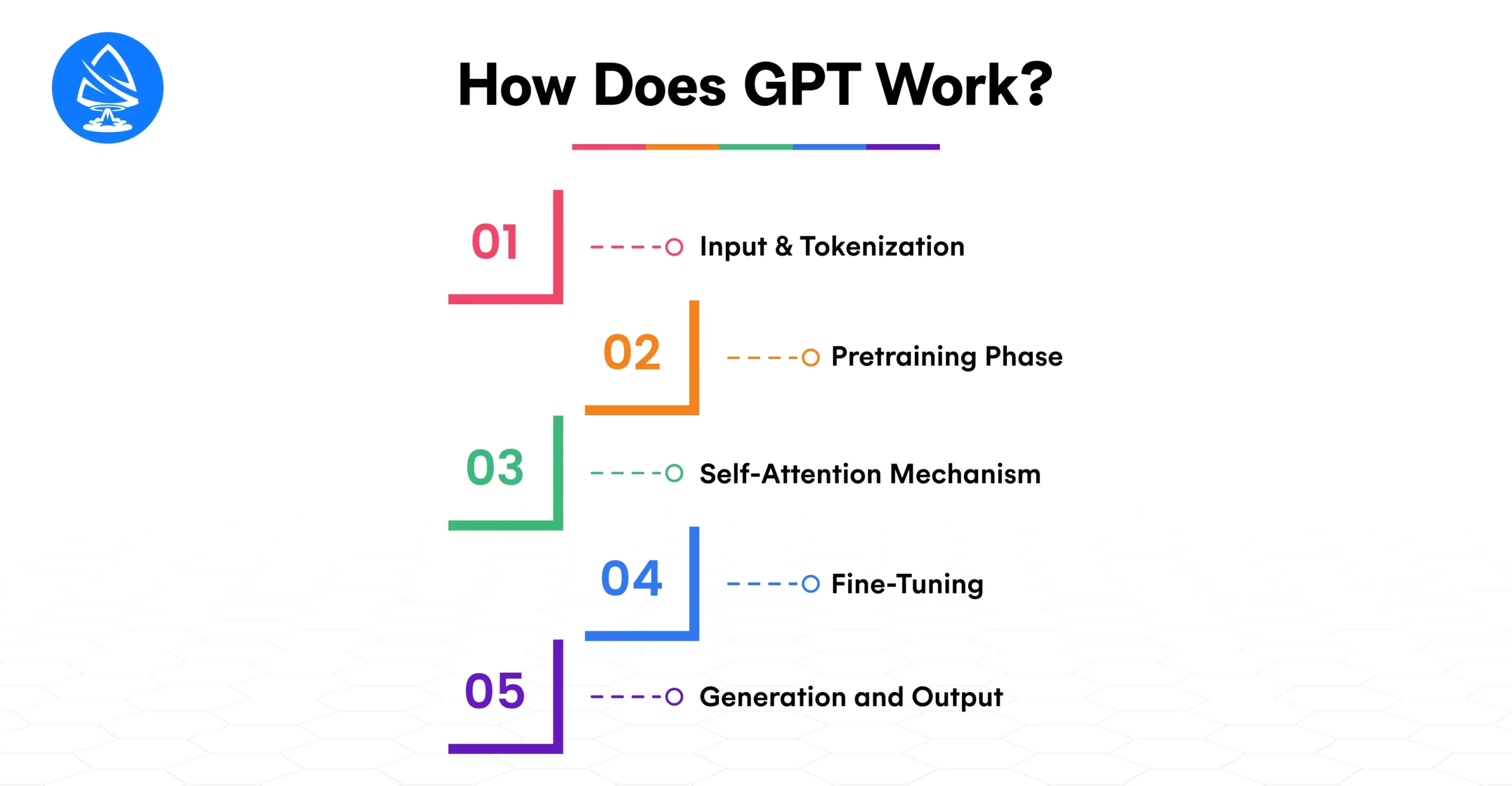
When you provide a prompt to a GPT model, the first step is tokenization. Tokenization breaks down your input text into smaller units (usually words or subwords) that the model can understand. Each token is assigned a unique numerical value, allowing the model to process the input in a form that it can work with.
During pretraining, GPT is exposed to vast amounts of text data from books, websites, and other sources. In this phase, the model learns to predict the next word in a sentence by analyzing context. For example, given the phrase “The sun rises in the,” the model learns that “east” is the most likely next word. By repeating this task on a large scale, GPT learns a deep understanding of language and its structure.
The self-attention mechanism is a key component of the transformer architecture. It allows GPT to focus on different parts of the input text when making predictions. For example, in the sentence “The cat sat on the mat,” self-attention enables the model to understand the relationship between “cat” and “sat” even though they are not next to each other in the sentence. This ability to capture long-range dependencies makes GPT models particularly powerful.
After pretraining, GPT can be fine-tuned on more specific datasets related to particular tasks, such as question answering, language translation, or text summarization. Fine-tuning adjusts the model’s weights based on task-specific data, helping it specialize and improve performance in those tasks.
When generating text, GPT predicts one token at a time based on the context provided by the input and previous tokens. It continues generating tokens until it reaches a stopping point, such as a maximum length or an end-of-sequence token. The result is a coherent and contextually relevant piece of text that aligns with the prompt.
While OpenAI’s GPT models like ChatGPT offer incredible capabilities, there are several reasons why you might want to build your own GPT model:
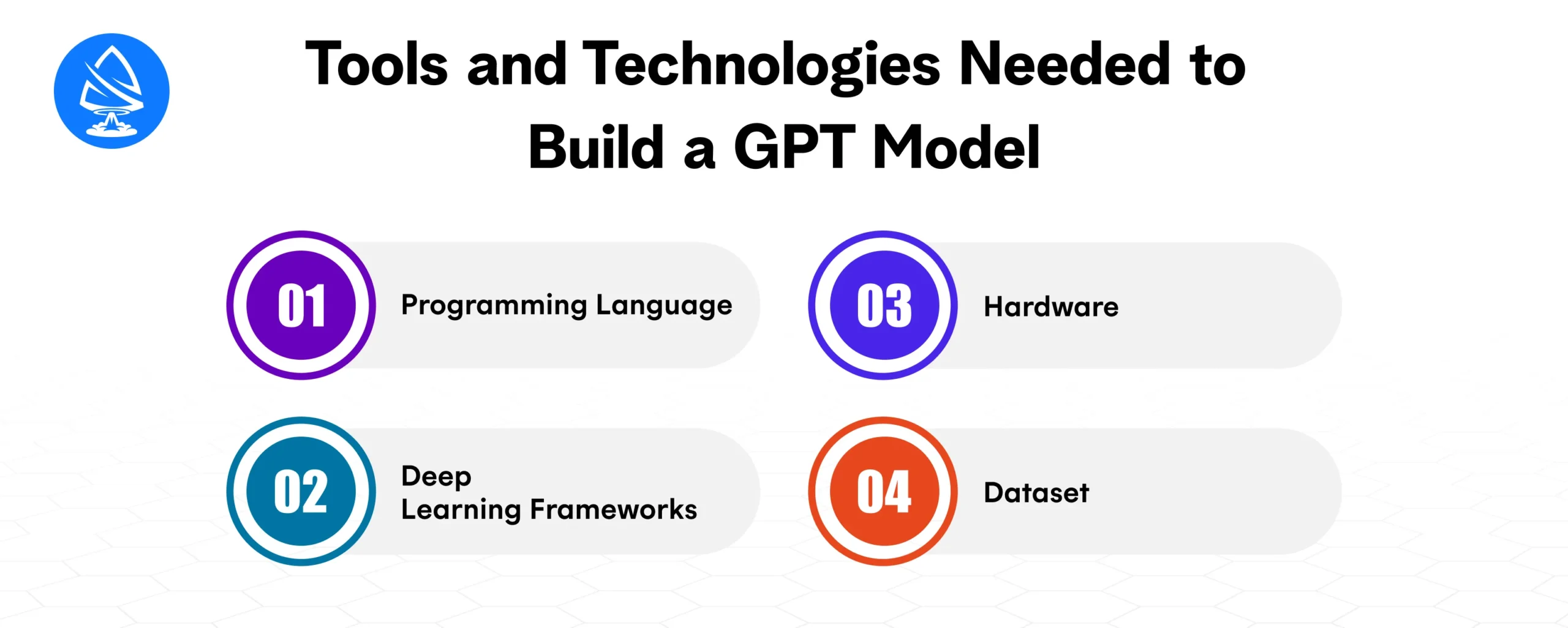
Python is the go-to programming language for building and deploying GPT models due to its extensive support for machine learning and data science libraries. Libraries like TensorFlow, PyTorch, and Hugging Face’s Transformers make it easier to build, train, and fine-tune deep learning models.
Training a GPT model requires substantial computational resources. For training from scratch, using Graphics Processing Units (GPUs) or Tensor Processing Units (TPUs) is essential. These accelerators significantly speed up the training process, reducing the time it takes to build and deploy your model.
A large and diverse dataset is crucial for training a high-quality GPT model. Data can come from various sources, including:
You may also want to know AI in Sports Industry

Set up your development environment with the necessary tools:
pip install torch tensorflow transformers
Gather a large dataset relevant to your task. For instance, if you want to create a GPT model for financial analysis, you’ll need financial news articles, reports, and other related data. Once you have the data, proceed with tokenization and cleaning.
from datasets import load_dataset
dataset = load_dataset(“wikipedia”, “20200501.en”)
You have two options:
Train From Scratch: If you have access to massive computational resources and large datasets, you can train the model from scratch. This involves initializing a transformer model and training it on your data.
Fine-Tuning an Existing Model: For most use cases, fine-tuning a pre-trained model (e.g., GPT-2, GPT-3) on your specific dataset is more practical. This approach saves time and computational resources.
Example: Fine-tune a pre-trained GPT-2 model on your custom dataset using Hugging Face’s Trainer API:
from transformers import GPT2LMHeadModel, GPT2Tokenizer, Trainer, TrainingArguments
model = GPT2LMHeadModel.from_pretrained(“gpt2”)
tokenizer = GPT2Tokenizer.from_pretrained(“gpt2”)
train_dataset = tokenizer(data, return_tensors=”pt”, padding=True, truncation=True)
training_args = TrainingArguments(output_dir=”./results”, num_train_epochs=3)
trainer = Trainer(model=model, args=training_args, train_dataset=train_dataset)
trainer.train()
After training the model, it’s essential to evaluate its performance. Use metrics like perplexity or BLEU score to evaluate the model’s text generation capabilities.
input_ids = tokenizer.encode(“Once upon a time”, return_tensors=”pt”)
generated_text = model.generate(input_ids, max_length=50, num_return_sequences=3)
print(tokenizer.decode(generated_text[0], skip_special_tokens=True))
Once you’ve fine-tuned your GPT model, you can deploy it in various ways:
Building a GPT (Generative Pretrained Transformer) model requires a careful, methodical approach to ensure that the model is trained effectively, performs well, and aligns with its intended application. Whether you’re building a custom model from scratch, fine-tuning a pre-trained GPT model, or adapting it for a specific task, following best practices will help you achieve optimal performance, scalability, and efficiency.
Here’s a comprehensive look at the best practices for building GPT models:
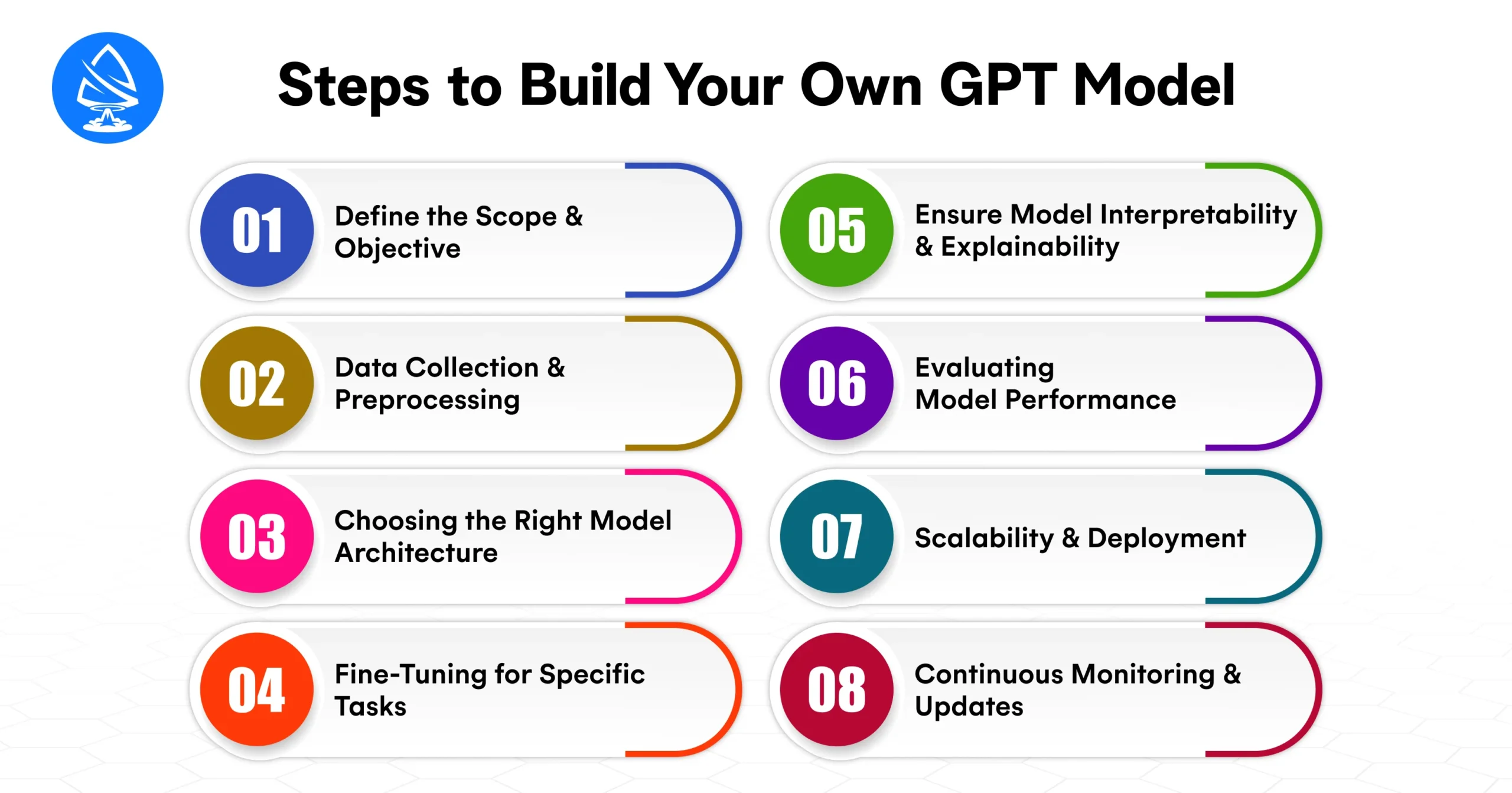
Before diving into the technical aspects of building your GPT model, it’s essential to clearly define the objective and scope of the project. Understanding what the model will be used for helps guide the development process and ensures that the model aligns with specific needs and goals.
Defining these parameters early in the process ensures that the model is built to meet real-world requirements, avoiding over-complication or wasted resources.
The quality of your data significantly impacts the performance of your GPT model. Building a powerful GPT model requires training it on massive datasets that reflect the language and task you are targeting.
For a customer service chatbot, gather conversation data, customer feedback, and product-related FAQs to ensure the model can generate meaningful, context-aware responses.
While GPT-3 and GPT-4 have set benchmarks for generative language models, there are multiple architecture options available for your project depending on your resource constraints, performance needs, and goals.
Fine-tuning is one of the most critical aspects of building a GPT model that performs well in a specific context. This involves taking a pre-trained model and adjusting its weights and parameters using your own domain-specific data.
For building a customer support AI chatbot, fine-tune GPT using conversation logs, common customer queries, and product information to ensure it understands domain-specific language and responses.
While GPT models are incredibly powerful, they are often referred to as “black-box” models because their decision-making processes aren’t always easy to interpret. Ensuring some level of interpretability is crucial, especially in industries like finance or healthcare, where transparency is critical.
In healthcare applications, AI systems must provide explanations for their recommendations, such as the reasoning behind a diagnosis or treatment suggestion.
Once your GPT model is trained or fine-tuned, it’s important to evaluate its performance before deployment. The model should not only generate text but also meet specific performance metrics that align with your business or project goals.
For a content generation tool, evaluate the model on its ability to create coherent, contextually accurate, and grammatically correct articles. You can use human evaluators or automated metrics to assess the quality.
After your GPT model is fine-tuned and evaluated, it’s time for deployment. GPT models can require substantial computational power, especially when scaling for production environments.
For an enterprise-level chatbot system, deploy your GPT model via API endpoints to integrate with the company’s customer service platform and scale to handle millions of user queries daily.
AI models, including GPT, require regular updates and monitoring to ensure they continue to perform well as data and circumstances change.
Building your own GPT model offers incredible opportunities to customize and optimize AI-driven text generation systems for your specific needs. By leveraging open-source frameworks and pre-trained models, you can save time and resources while still benefiting from the power of AI. Whether you’re a researcher, entrepreneur, or business leader, mastering the development of GPT models opens up new possibilities for innovation and automation.
Ready to build your own GPT model? Partner with a custom AI development company or hire AI developers to bring your GPT-based projects to life. Use our Cost Calculator to estimate your AI development project and start creating your model today!
1. What is a GPT model?
A GPT model is a type of transformer-based deep learning model used for natural language processing (NLP) tasks, such as text generation, summarization, and translation.
2. Do I need to train my own GPT model?
It depends on your use case. You can fine-tune an existing GPT model for specific tasks, or train one from scratch if you have the necessary resources and a large dataset.
3. How much data do I need to train a GPT model?
Training a GPT model from scratch requires massive datasets, typically in the range of tens of gigabytes or more. However, fine-tuning an existing model requires much less data.
4. Can I use GPT models for tasks other than text generation?
Yes, GPT models can also be used for question answering, summarization, and language translation, among other NLP tasks.
5. What are the system requirements for training a GPT model?
To train a GPT model, you need high-performance GPUs or TPUs. For smaller-scale models, a GPU with at least 16GB VRAM is recommended.
6. How long does it take to train a GPT model?
Training time depends on factors like the model size, dataset size, and hardware used. Fine-tuning can take a few hours to days, while training from scratch can take weeks or months.
7. Can I integrate GPT models into my applications?
Yes, you can integrate GPT models into web apps, chatbots, customer service systems, and more via APIs or direct deployment.
8. Are there open-source GPT models available?
Yes, models like GPT-2 and GPT-3 (via OpenAI API) are available for fine-tuning and integration into your applications.

Artoon Solutions
Artoon Solutions is a technology company that specializes in providing a wide range of IT services, including web and mobile app development, game development, and web application development. They offer custom software solutions to clients across various industries and are known for their expertise in technologies such as React.js, Angular, Node.js, and others. The company focuses on delivering high-quality, innovative solutions tailored to meet the specific needs of their clients.
 For business inquiries only




