- HR:+91-879-9184-787
- Sales:+91-908-163-7774



The world of AI tools for developers is rapidly evolving, providing incredible opportunities to streamline workflows, enhance productivity, and make coding faster and more efficient. In 2025, AI-powered tools are transforming how developers approach their work by offering intelligent assistance for everything from code generation to bug detection and automated testing. Whether you’re an experienced software engineer or a beginner looking to improve your coding practices, using the best AI tools for developers can significantly enhance your development process.
In this post, we’ll take a closer look at the top AI tools available for developers in 2025, covering their features, benefits, and how they can help you optimize your workflow and code quality. Many developers are partnering with an AI app development company to harness the full potential of these tools, streamlining their development process. By leveraging these tools, developers can focus on writing high-quality code while leaving the repetitive tasks and optimization work to the AI.
AI tools refer to software applications and platforms that leverage artificial intelligence (AI) and machine learning (ML) technologies to perform tasks that typically require human intelligence. These tools are designed to automate processes, analyze data, assist with decision-making, and solve complex problems by mimicking human cognitive functions such as reasoning, learning, and problem-solving. AI tools are becoming increasingly prevalent across industries, from software development and healthcare to finance, marketing, and customer service.
In simple terms, AI tools use algorithms and vast amounts of data to recognize patterns, make predictions, and offer recommendations or insights. They help businesses and individuals achieve greater efficiency, productivity, and accuracy in tasks that would be time-consuming or difficult for humans to perform manually.
Let’s dive deeper into what AI tools are and how they work.
AI tools can be broken down into different categories, each with its unique capabilities. Below are some of the most common types of AI tools and their applications:
Machine learning tools use algorithms that allow computers to learn from data and improve their performance over time without being explicitly programmed. These tools are widely used for tasks such as data analysis, pattern recognition, predictive modeling, and natural language processing (NLP).
Example: Tools like Google AI and IBM Watson leverage ML models to analyze data, identify trends, and make predictions based on patterns they have learned from historical data.
NLP tools are designed to process and understand human language. These tools can analyze, interpret, and generate text or speech. Common applications of NLP include chatbots, voice assistants, and automated translations.
Example: OpenAI’s GPT-3 and Google BERT are popular NLP models used in various applications, including conversational AI, sentiment analysis, and language translation.
Computer vision tools enable machines to “see” and interpret the world around them. These tools use AI to process and understand images and video, detecting objects, identifying patterns, and making decisions based on visual data.
Example: TensorFlow and OpenCV are computer vision tools that are widely used in applications like facial recognition, autonomous vehicles, and medical imaging.
AI-powered automation tools focus on automating repetitive tasks by mimicking human actions. These tools can streamline workflows, enhance productivity, and reduce manual labor in areas like data entry, customer service, and marketing campaigns.
Example: UiPath and Automation Anywhere provide robotic process automation (RPA) tools that automate routine tasks, such as data extraction, report generation, and customer queries.
These tools assist developers by automating coding tasks, optimizing workflows, and providing intelligent code suggestions. AI-powered coding tools can detect errors, suggest code improvements, and even generate code from natural language descriptions.
Example: GitHub Copilot and Tabnine are AI tools designed for code completion, bug detection, and suggestion generation in various programming languages.
You may also want to know the Best AI Coding Tools
AI tools work by applying advanced algorithms, large datasets, and machine learning models to process and analyze information. Here’s how they generally work:
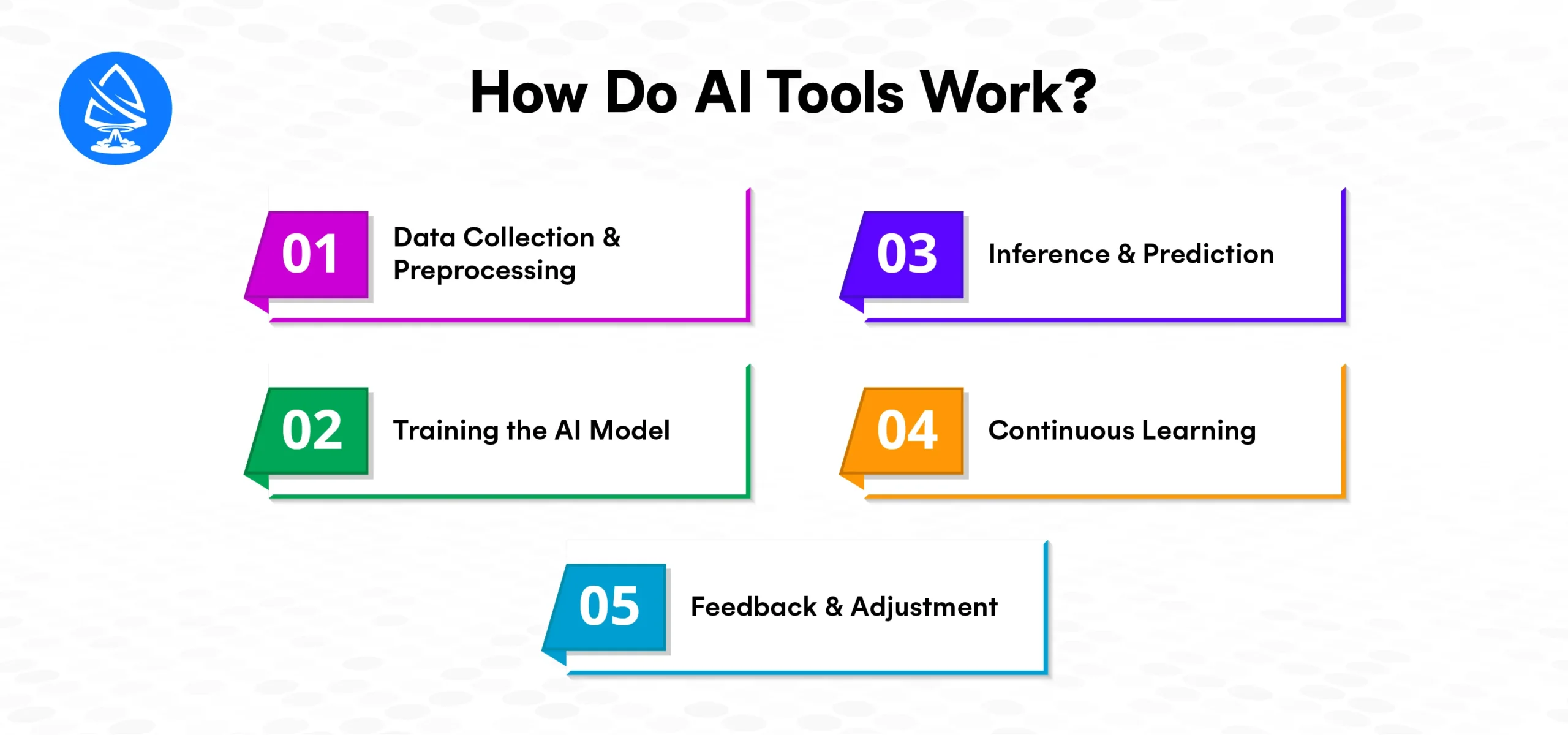
AI tools rely heavily on data, and the quality of the data directly impacts their performance. The first step in using AI tools is gathering large amounts of relevant data. This data is then cleaned, transformed, and prepared for analysis. Data preprocessing may include steps like removing duplicates, normalizing values, and handling missing data.
Example: For a computer vision tool, the data might be a large collection of labeled images that teach the AI to recognize objects within new images.
Once the data is prepared, AI tools train machine learning models on this data. Training involves feeding the data to the model and allowing it to learn patterns and relationships within the data. The AI “learns” by adjusting its parameters based on the feedback it receives from the data during this process.
Example: In supervised learning, a model might be trained on a set of images labeled with objects (e.g., cats, dogs), learning to recognize patterns that distinguish each category.
After training, the AI tool can be used to make predictions or offer recommendations based on new, unseen data. This is known as inference, where the trained AI model is applied to real-world scenarios. AI tools can process real-time data and generate outputs, such as recommendations, predictions, or automated actions.
Example: A predictive AI tool for financial forecasting might analyze past stock market data and predict future trends, helping investors make informed decisions.
AI tools, especially those that use machine learning, are designed to improve over time. As more data becomes available, the tool continues to learn and adapt its models. This process of continuous learning ensures that the tool stays up-to-date and improves its accuracy as new patterns and trends are discovered.
Example: A chatbot trained to handle customer inquiries improves its responses over time by analyzing past conversations and user feedback.
Some AI tools, especially those used for recommendations, use feedback loops. When users interact with the AI tool, this data is used to fine-tune the AI model, making it more tailored to user preferences and behavior.
Example: A music streaming service like Spotify uses user feedback to continuously adjust its AI-powered music recommendations.
The primary benefits of using AI tools in various fields are as follows:
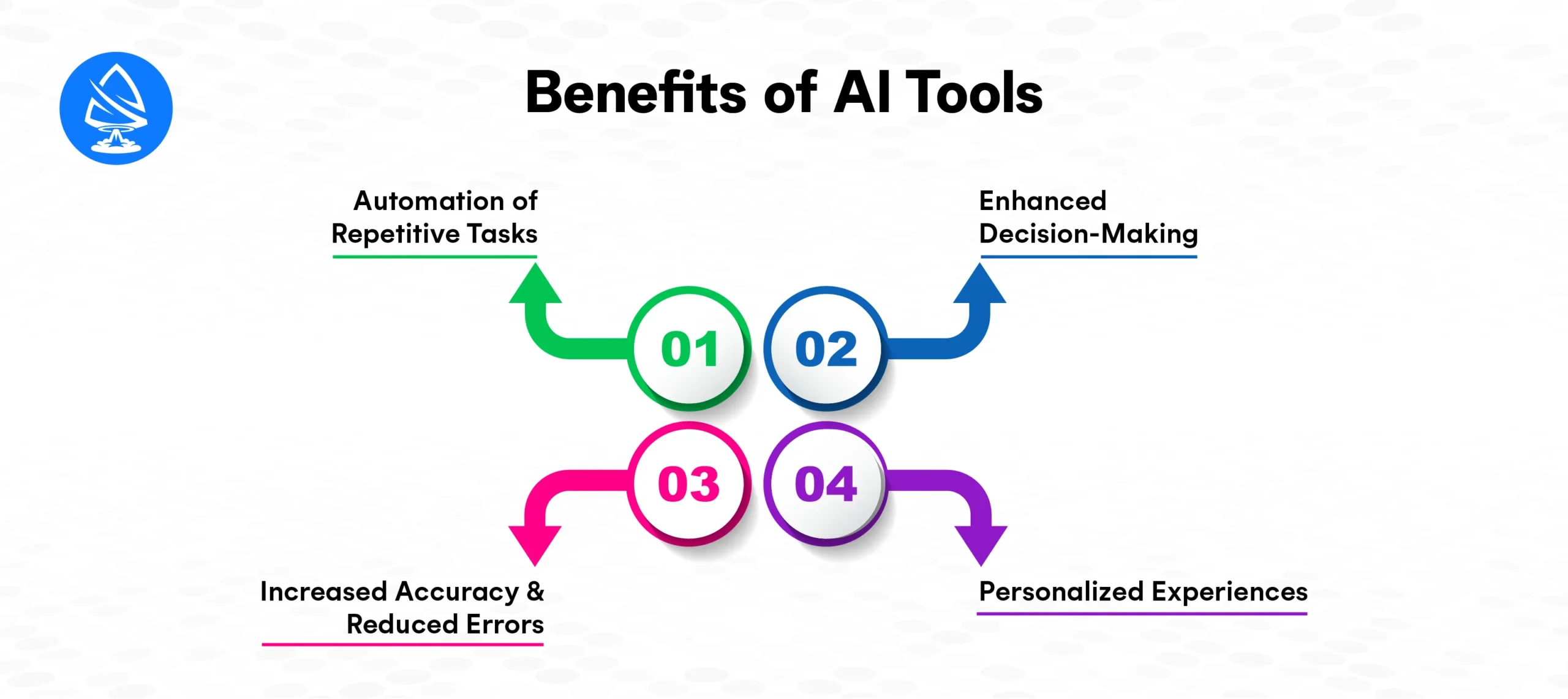
AI tools can handle tedious, repetitive tasks, freeing up human workers to focus on more creative and strategic activities. This can significantly boost productivity and reduce costs.
Example: AI tools in customer service, like chatbots and virtual assistants, can automate interactions with customers, handling inquiries, complaints, and FAQs without human intervention.
AI tools can analyze vast amounts of data in real-time, providing actionable insights that humans might miss. By making decisions based on data, AI tools can help improve business strategies, financial planning, and more.
Example: In healthcare, AI tools can analyze patient data to provide doctors with insights into potential diagnoses, treatment options, and outcomes.
AI models, especially those based on machine learning, are capable of identifying patterns and making predictions with a level of precision and accuracy that surpasses human capability.
Example: AI tools in software development can automatically detect coding errors and security vulnerabilities in real-time, reducing human errors in the code.
AI tools can provide highly personalized experiences for customers and end-users by analyzing their preferences, behavior, and interactions.
Example: E-commerce platforms use AI to offer product recommendations based on past browsing and purchasing behavior.
AI tools are being implemented across various industries to improve processes, create efficiencies, and solve complex problems. Some key applications include:
You may also want to know Robotic Process Automation
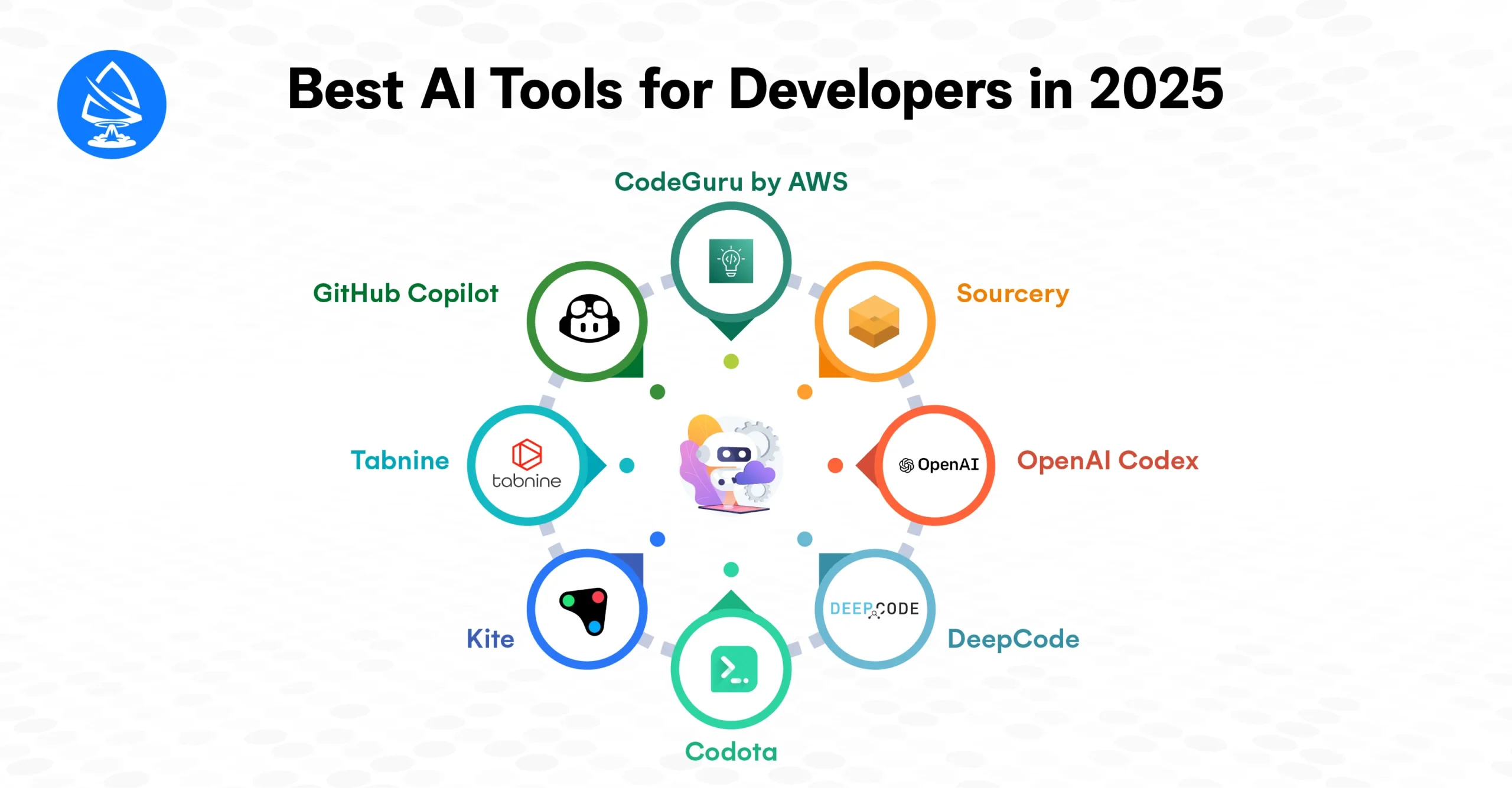
GitHub Copilot, developed by GitHub in collaboration with OpenAI, is one of the most popular AI tools for developers today.
Example: While writing a Python function to fetch data from an API, GitHub Copilot suggests the appropriate API request method, handles error catching, and even structures the data parsing.
Tabnine is another powerful AI tool for coding that assists with code completion and suggestions. It integrates seamlessly into a variety of IDEs, including VS Code, JetBrains, Atom, and Sublime Text.
Example: In JavaScript, as you type the first few characters of a function call, Tabnine predicts the rest of the function signature, making it easier to complete lines of code quickly.
Kite is an AI-powered coding assistant tailored specifically for Python developers.
Example: Kite helps developers by suggesting Python libraries and offering auto-completion of function parameters, making the coding process more efficient.
Codota is an AI tool for Java and Kotlin developers. It provides intelligent code completions, snippets, and suggestions. Codota analyzes existing code to improve accuracy. It integrates with IntelliJ IDEA, Android Studio, and VS Code. This helps developers write code faster with fewer errors.
Example: Codota suggests API methods and completes function signatures while you are writing Android app code, helping you quickly integrate third-party libraries and APIs.
DeepCode is an AI-powered code review tool that analyzes your codebase and provides real-time suggestions for improving code quality. It detects bugs, potential vulnerabilities, and performance bottlenecks, helping developers write better and more secure code.
Example: DeepCode highlights potential issues like null pointer exceptions, unused imports, and code that violates security best practices in a Java project.
OpenAI Codex, the engine behind GitHub Copilot, is a powerful AI code generator that can generate code from simple descriptions written in natural language. It can understand and translate natural language prompts into functional code in various programming languages.
Example: If you type “Generate a Python function to fetch weather data from an API”, Codex automatically writes the complete code to perform the task.
Sourcery is an AI tool for Python developers that helps improve the quality of Python code by suggesting refactorings and optimizations. It focuses on making Python code cleaner and more efficient by offering real-time suggestions for improving code structure.
Example: Sourcery suggests more efficient ways to process data in Python, such as replacing for loops with list comprehensions for better readability and performance.
CodeGuru is an AI-powered tool developed by Amazon Web Services (AWS) that helps developers perform code reviews automatically. It analyzes code and provides suggestions for bug fixes, security vulnerabilities, and performance improvements.
Example: While reviewing a Java application, CodeGuru flags a potential security vulnerability in the code related to improper handling of user input.
AI tools are transforming the software development process. They help developers write better code faster. These tools identify bugs early and optimize performance. AI allows developers to automate repetitive tasks. It improves code accuracy and enforces best practices. AI tools support code completion, generation, and real-time bug detection. They significantly boost developer productivity.
As AI continues to advance, these tools will evolve, becoming more powerful and offering even greater assistance to developers.
1. What are AI tools for developers?
AI tools for developers use artificial intelligence to assist with coding tasks. These tasks include code completion and bug detection. They also support code refactoring and automatic code generation. These tools improve productivity and code quality.
2. How do AI coding tools improve productivity?
AI coding tools improve productivity by automating repetitive tasks. They suggest code completions and identify bugs in real time. This allows developers to focus on higher-level tasks.
3. Are AI tools for developers available for free?
Many AI tools for developers offer free versions with basic features. Advanced features often require paid subscriptions or enterprise plans.
4. How does GitHub Copilot help developers?
GitHub Copilot helps developers by suggesting code completions and snippets. It can also generate entire code blocks. Suggestions are based on the current code context.
5. What programming languages do AI coding tools support?
AI coding tools support a wide range of programming languages, including Python, JavaScript, Java, C++, TypeScript, and many more.
6. How does Codex work in AI code generation?
Codex, powered by OpenAI, converts natural language prompts into functional code. It supports multiple programming languages. Developers can generate code by describing the desired functionality.
7. Can AI tools replace human developers?
No, AI tools complement human developers rather than replace them. They automate repetitive tasks and provide intelligent suggestions. Human expertise remains crucial for strategic decisions and problem-solving.

Artoon Solutions
Artoon Solutions is a technology company that specializes in providing a wide range of IT services, including web and mobile app development, game development, and web application development. They offer custom software solutions to clients across various industries and are known for their expertise in technologies such as React.js, Angular, Node.js, and others. The company focuses on delivering high-quality, innovative solutions tailored to meet the specific needs of their clients.
 For business inquiries only




